
Girls Birthday AI Photo Editing Prompts 2026 – Realistic ChatGPT Birthday Prompts – The Prompt Baba
 By Sudip Jana
0 Comments
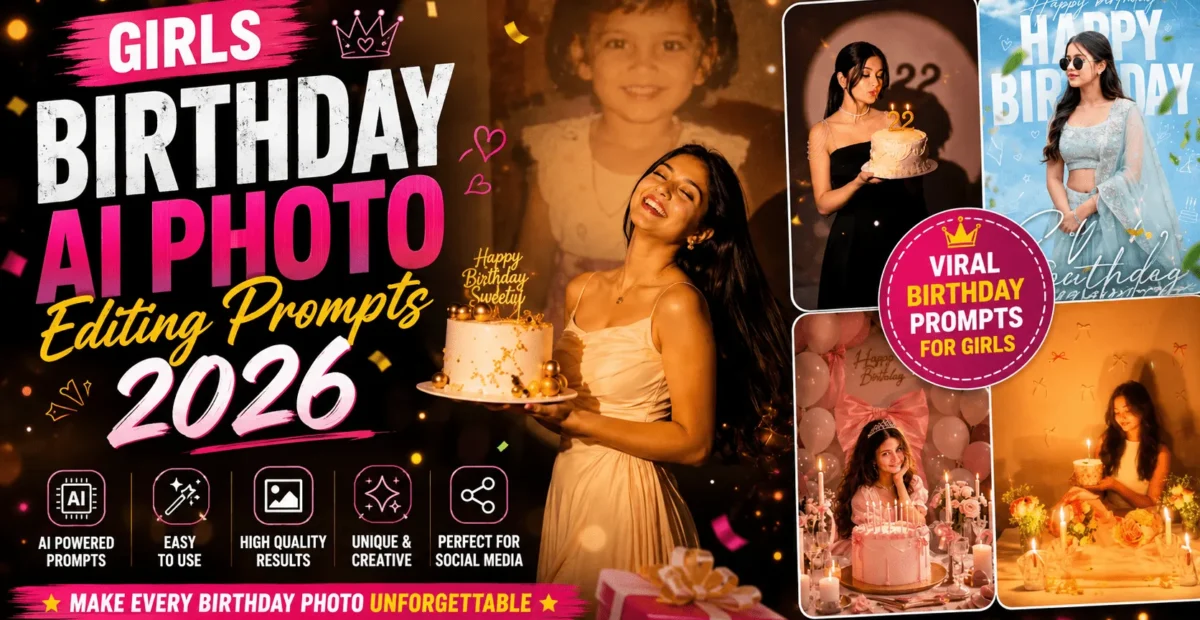
Birthdays are special, and the right portrait can turn a beautiful memory into something unforgettable. With Girls Birthday AI Photo Editing Prompts 2026, you can transform an ordinary photo into a cinematic birthday portrait featuring elegant outfits, glowing candles, beautiful decorations, and professional studio lighting.
You do not need an expensive photoshoot or advanced editing skills. Upload a clear reference photo, copy one of the prompts below, and let your preferred AI image tool create a personalized birthday portrait. Whether you prefer a dramatic studio look or a soft, romantic celebration, these prompts will help you get started.
What Are Girls Birthday AI Photo Editing Prompts 2026?
Girls birthday AI photo editing prompts are detailed text instructions that guide an AI image generator in creating or editing birthday portraits. They describe the outfit, background, lighting, cake, decorations, camera angle, and overall mood of the final image.
When you upload a reference photo, you can ask the AI to preserve the person’s recognizable facial features while changing the surroundings and styling. Results vary depending on the tool, the quality of your reference photo, and the instructions you provide.
Why Are Birthday AI Photo Prompts So Popular?
AI birthday portraits are popular because they make creative photoshoots accessible to beginners. You can experiment with different themes, outfits, colors, and lighting without arranging a physical studio.
- Personalized portraits: Create a birthday photo inspired by your own style.
- Creative backgrounds: Experiment with studio spotlights, floral decorations, balloons, and candlelit settings.
- Fashion-inspired looks: Try elegant gowns, modern party dresses, or traditional outfits.
- Social media content: Create portraits suitable for Instagram posts, profile pictures, and birthday stories.
- Easy experimentation: Adjust the prompt and generate different versions until you find a look you like.
2 Best Girls Birthday AI Photo Editing Prompts 2026
Below are two detailed prompts for creating realistic, attractive birthday portraits. Upload your reference photo before using a prompt. Replace the sample name and age with your preferred details where needed.
1. Cinematic Birthday Portrait with a Childhood Memory
This prompt creates a dramatic birthday photoshoot with a dark studio background, a circular spotlight, a birthday cake, and a nostalgic childhood photograph displayed behind the present-day subject. It is ideal for a meaningful birthday portrait with a cinematic atmosphere.
Create an ultra-realistic cinematic birthday photoshoot portrait in a vertical 9:16 composition. Use the first uploaded reference photo as the primary subject and preserve her recognizable facial identity, natural skin tone, facial proportions, and distinctive features.

The scene is an elegant photography studio with a deep charcoal background and a large circular spotlight projected onto the wall. Inside the spotlight, display a softly faded, vintage-style childhood photograph of the same person using the second reference image, if provided. Give the childhood photograph a subtle nostalgic texture and gentle blur.

In the foreground, the present-day woman wears an elegant flowing cream-colored gown and holds a beautiful white birthday cake decorated with delicate gold accents. The cake has a simple birthday topper with the text "Happy Birthday [Name]". She is laughing naturally with her head slightly tilted back, eyes gently closed, and long dark hair flowing gracefully behind her. Create a relaxed, joyful pose with realistic body proportions and natural movement.

Use warm studio lighting, soft golden highlights, cinematic shadows, realistic fabric texture, detailed cake frosting, and professional DSLR portrait photography. Maintain natural skin texture, realistic hands, accurate anatomy, and a sophisticated editorial aesthetic.

Keep the composition balanced, with the subject clearly separated from the background. Use shallow depth of field, subtle film-like color grading, and high detail. Preserve the person's identity rather than creating a different face. Avoid excessive skin smoothing, distorted fingers, extra limbs, random objects, misspelled text, logos, and watermarks.
Best for: Dramatic birthday portraits, milestone birthdays, memory-themed photos, and elegant social media posts.
2. Warm Candlelit Birthday Portrait with a Floral Cake
Choose this prompt if you prefer a soft, romantic birthday aesthetic. It features a floral cake, warm candlelight, pastel decorations, and a peaceful pose that creates a refined editorial-style portrait.
Create a photorealistic, elegant birthday portrait of the woman in the uploaded reference photo. Preserve her recognizable facial identity, natural skin tone, facial structure, and distinctive features. Use a vertical 9:16 composition with a centered, waist-up portrait photographed at eye level.

The woman is sitting behind a natural wooden table, holding a small vintage-inspired birthday cake decorated with delicate white frosting and subtle floral details. A single glowing candle sits on top of the cake. She gently looks down at the flame with a peaceful, natural smile.

Style her in an elegant ivory sleeveless outfit with realistic fabric texture. Her dark hair falls naturally around her shoulders in soft waves. Arrange pastel bouquets of blush-pink roses, white flowers, and delicate baby's breath on both sides of the cake. Place a few elegant candles in clear glass holders around the flowers and scatter a small number of flower petals across the table.

The background is a warm beige wall decorated with subtle white and blush-pink ribbon bows. Use soft golden candlelight to illuminate her face, with gentle shadows on the wall, creamy highlights, natural skin texture, realistic hands, and beautifully rendered cake details.

Create a romantic atmosphere with a soft pastel color palette, shallow depth of field, subtle bokeh, diffused lighting, professional 85mm portrait photography, and realistic proportions. Keep the scene clean, balanced, and natural. Preserve the reference person's identity and avoid artificial skin, excessive retouching, distorted fingers, extra objects, unwanted text, logos, and watermarks.

Do not add birthday lettering to the image. Leave the composition elegant and uncluttered so a birthday message can be added later in a design editor.
Best for: Soft birthday portraits, floral themes, elegant Instagram posts, and romantic candlelit photography.
How to Use Girls Birthday AI Photo Editing Prompts 2026
Follow these simple steps to turn your reference photo into a birthday portrait.
- Choose a photo: Select a clear portrait in which your face is easy to see.
- Open an AI image tool: Choose a platform that supports image uploads and photo editing.
- Upload your reference: Add your photo and any additional reference image required by the prompt.
- Copy a prompt: Choose one of the two prompts above and paste it into the tool.
- Personalize the details: Change the outfit, cake decorations, color palette, or birthday name to suit your preferences.
- Generate and review: Check the face, hands, cake, clothing, and background. Adjust the instructions if necessary.
- Save your result: Download the final image and add any birthday text separately if needed.
What Kind of Photo Gives the Best Results?
Your reference photo plays an important role in the final result. A clear image makes it easier for an AI tool to reproduce recognizable facial features.
- Clear facial details: Use a sharp, high-resolution photograph.
- Good lighting: Natural daylight or soft indoor lighting usually works well.
- Visible face: Avoid sunglasses, heavy shadows, or objects covering the face.
- Minimal filters: A natural photo gives the AI a cleaner reference.
- Simple composition: A solo portrait is often easier to edit than a crowded group photo.
Which AI Tools Can You Use?
You can try these AI platforms for birthday portrait generation and editing. Features, image-upload support, pricing, and usage limits may vary by plan and change over time.
| AI Tool | Suitable For | What to Consider |
|---|---|---|
| ChatGPT | Conversational image creation and editing | Available features and limits depend on your plan. |
| Google Gemini | Beginner-friendly image creation and editing | Image features may vary by account and region. |
| Adobe Firefly | Creative edits and lighting effects | Check current image-generation credits and features. |
| Leonardo AI | Style experimentation and portrait generation | Results depend on the selected model and settings. |
| Midjourney | Stylized and cinematic visual concepts | Check current subscription requirements and reference-image options. |
For beginners, start with a tool that makes uploading a reference photo and refining an image straightforward. Test the same prompt more than once if the first result does not match your expectations.
Pro Tips for Realistic Birthday Results
- Describe the lighting: Specify warm candlelight, soft studio lighting, or a dramatic spotlight instead of using only the word “beautiful.”
- Choose a clear color palette: Cream and gold, blush pink and white, or black and gold can create a more consistent visual style.
- Protect facial likeness: Include an instruction to preserve the reference person’s recognizable features and natural skin texture.
- Be specific about the outfit: Mention the garment, color, fabric, and overall style.
- Generate several variations: Compare the results and select the one with the most natural face, hands, and proportions.
- Add text afterward: AI-generated lettering can contain errors. Use a design editor to add names, ages, or birthday wishes accurately.
- Review before sharing: Check for unwanted objects, distorted details, and changes to the person’s appearance.
Common Problems and Quick Fixes
| Problem | Suggested Fix |
|---|---|
| The face looks different | Use a clearer reference image and strengthen the instruction to preserve facial identity. |
| Skin looks artificial | Request natural skin texture, realistic pores, and minimal retouching. |
| Hands look distorted | Ask for natural hand proportions and realistic fingers, then regenerate if needed. |
| The cake looks unrealistic | Describe its size, frosting, decorations, and candle placement more clearly. |
| The background feels generic | Specify the wall color, lighting, decorations, and overall atmosphere. |
| Birthday text is incorrect | Generate the image without text and add the message manually afterward. |
| The result looks like an illustration | Request photorealistic photography, natural lighting, and realistic materials. |
Frequently Asked Questions
Can I use these prompts for any birthday age?
Yes. You can adapt the prompts for different birthday ages by changing the cake decorations, outfit, setting, and other details. Keep the styling appropriate for the person being photographed.
Will AI preserve my original face?
AI tools can often preserve recognizable features, but an exact match is not guaranteed. Use a clear reference photo and review the generated result carefully.
Can I create a birthday portrait for a friend?
Yes, provided you have permission to use your friend’s photograph. Be especially careful when uploading personal photos to online AI services or sharing edited images publicly.
How can I add my name or birthday message?
Generate the portrait first, then use a design editor such as Canva to add your name, age, or birthday greeting. This makes it easier to control the spelling, font, color, and placement.
Are these birthday AI prompts free to use?
You can copy and adapt the prompts in this article. However, the AI tools you use may have free usage limits, paid features, or subscription requirements.
Conclusion
Girls Birthday AI Photo Editing Prompts 2026 make it easier to experiment with beautiful birthday portraits without arranging a professional photoshoot. From a dramatic studio scene with a nostalgic childhood memory to a warm, candlelit portrait with floral decorations, the right prompt can help you create a look that reflects your personality.
Start with a clear reference photo, choose your favorite prompt, and adjust the details to match your vision. Review the final image carefully and add your birthday message separately for a polished result.
Your birthday portrait can be creative, personal, and memorable. Try these prompts and create a birthday photo that you will be happy to share and keep.
“`